
What Is Social Media Governance?
Fink and Zerfass (2010, p. 5) define social media governance as “a formal or informal regulatory framework for the actions of members of the organization in the social web.” Macnamara and Zerfass (2012) frame it slightly differently: as one of the areas where organisations must balance the openness and two-way dialogue of social media against the need for strategy, control and management.
The first definition tells us what governance is: the rules, written or unwritten, that guide how staff behave on social media. The second explains why it is difficult: too much control makes a brand slow and robotic, while too little creates risk. Good governance finds a balance, so that staff can respond quickly and naturally while the organisation stays safe, legal and on-brand.
Governance also depends on how the organisation is structured. Owyang (2010) identified five ways companies organise for social media: Organic (anyone does their own thing), Centralised (one team controls everything), Coordinated (a central team supports and trains other departments), Multiple Hub and Spoke, or “Dandelion” (each business unit has its own hub, linked to a central group), and Holistic, or “Honeycomb” (every employee is enabled to take part in a consistent way). These models were introduced in the Social Media Marketing Strategy lesson; here we look at the tools and rules that make each one work.
The Staff Social Media Policy
A social media policy is the written document that turns governance into clear guidance for employees. It usually covers two areas.
Official brand accounts: who may post, who approves content, the brand’s tone of voice, response times, how to handle complaints, and what to do in a crisis.
Personal use by staff: when staff may mention their employer, the need to make clear that personal views are their own, keeping confidential information private, not posting about colleagues or customers without permission, and the consequences of breaking the policy.
The policy should be short enough to be read, explained in staff training, and reviewed at least once a year as platforms and laws change.
Approval Workflows, Roles and Permissions
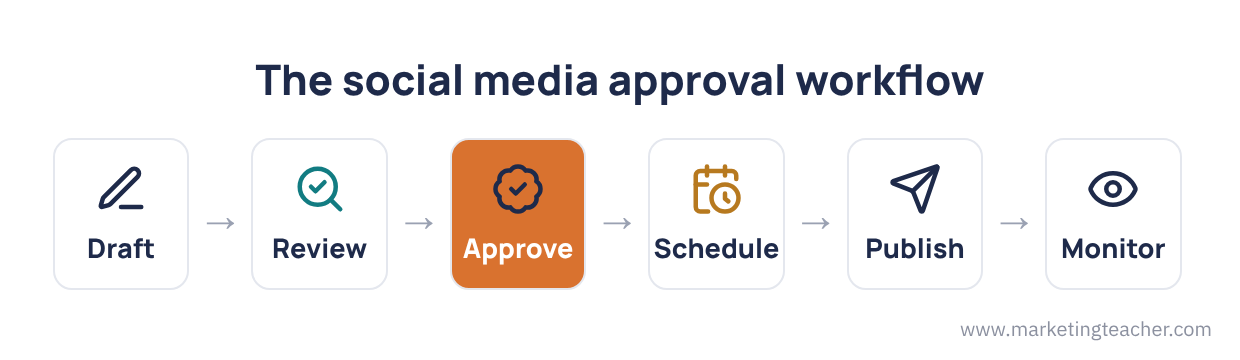
An approval workflow sets out the steps a post passes through before it goes live. A typical workflow is: Draft → Review → Approve → Schedule → Publish → Monitor. Routine posts may need only one approver; sensitive posts, such as anything about prices, health claims, legal matters or news events, may need a second check from a senior manager or the legal team.
Roles and permissions control who can do what on each account. Most platforms and management tools allow different levels of access, for example:
- Administrator: full control, including adding and removing users. Keep this to two or three trusted people.
- Editor or publisher: can create, schedule and publish posts.
- Contributor: can draft posts that must be approved by someone else.
- Analyst: can view reports but not post.
Two simple rules prevent many problems: never share one login between several people, and remove access on the day someone leaves the organisation or an agency contract ends.
Social Media Management Tools
Social media management tools fall into a few broad categories:
| Category | What it does | Examples |
|---|---|---|
| Native tools | Free tools provided by each platform | Meta Business Suite, LinkedIn Page admin |
| Scheduling and publishing | Plan and post content across several platforms from one calendar | Buffer |
| All-in-one management | Scheduling, shared inbox, approvals, reporting and team permissions | Sprout Social, Hootsuite |
| Listening and analytics | Track mentions, sentiment and competitors | Brandwatch, Meltwater |
| Asset and design | Store approved images and templates | Canva, shared drives |
The right choice depends on team size, the number of accounts, the need for approval workflows, and budget. A sole trader may manage well with native tools; a large retailer with several teams will usually need an all-in-one platform that records who approved each post. Tuten (2024) deals with strategy and planning before tactics and execution, and the same order applies here: choose the tool to fit the plan, not the plan to fit the tool.
Budgets, Risk and Compliance
A social media budget usually covers five areas: staff time (often the largest cost), tools and software, content production (photography, video, design), paid advertising, and influencer or agency fees. Many organisations also keep a small reserve for testing new platforms or responding to a crisis.
Risk and compliance is where governance matters most. Key UK issues include:
- Advertising rules: the CAP Code requires marketing to be “obviously identifiable”. Posts on a brand’s own account are usually clear, but when employees or other people with a commercial connection promote the brand, the content may need a clear upfront label such as “#ad” (ASA, n.d.). See Influencer Marketing.
- Data protection: collecting entries, running competitions and using tracking tools must follow UK GDPR. See UK GDPR and Marketing Compliance.
- Copyright: images, music and customer photos need permission before reuse.
- Sector rules: regulated sectors such as finance, alcohol, gambling and health have extra advertising rules.
- Account security: two-factor authentication, strong passwords and controlled access reduce the risk of hacked accounts.
Summary
Social media governance is the framework of rules that guides how staff act on social media (Fink & Zerfass, 2010), and it involves balancing openness with control (Macnamara & Zerfass, 2012). Owyang’s (2010) five organisational models show how structure shapes governance. A staff policy, a clear approval workflow and sensible roles and permissions turn governance into daily practice. Management tools range from free native tools to all-in-one platforms, and should be chosen to fit the strategy and team. Budgets should include staff time as well as ad spend, and compliance covers advertising rules, data protection, copyright, sector rules and account security.
The slides, worksheet, lesson plan and poster for this lesson are free to download and free to use in your course — no sign-up, no permission needed. See the teacher resources →
Assign this lesson to your class:
Using Canvas, Blackboard or Moodle? Copy the link and paste it into your course page or assignment. More ways to add lessons to your LMS.

