
What Is Community Management?
Two formal definitions help us here. Muniz and O’Guinn (2001) define a brand community as “a specialized, non-geographically bound community, based on a structured set of social relations among admirers of a brand.” Grimmelmann (2015) defines moderation as “the governance mechanisms that structure participation in a community to facilitate cooperation and prevent abuse.”
The two definitions look at the same thing from different sides. Muniz and O’Guinn describe who the community is: people linked by a shared interest in a brand rather than by where they live. Grimmelmann describes how the community is kept working: the rules and tools that encourage helpful behaviour and stop harmful behaviour. Community management sits where the two meet. It is the day-to-day work of building relationships with members while keeping the space safe, useful and on-brand.
The Social Community Zone lesson explains why brands want communities; this lesson covers the practical job of running one.
The Community Manager Role
A community manager is the person or team who looks after a brand’s online communities. Typical tasks include:
- Listening and responding: reading comments, messages and mentions, and replying in the brand’s voice.
- Content and conversation starting: posting questions, polls and prompts that get members talking to each other, not just to the brand.
- Moderation: applying the community guidelines and removing harmful content.
- Advocacy: spotting loyal fans and helpful members and giving them recognition.
- Feedback loop: passing product ideas, complaints and trends to other departments.
- Reporting: tracking how healthy the community is and sharing results with managers.
Tuten (2024) treats community as one of the four zones of social media marketing, and stresses that brands earn a place in communities by adding value rather than by broadcasting. The community manager is the person who turns that principle into daily behaviour.
Community Guidelines and Types of Moderation
Community guidelines are the published “house rules” for a brand’s page or group. Good guidelines are short, plain and pinned where members can see them. They usually cover: what the space is for; respectful behaviour (no abuse, hate or harassment); no spam or unapproved selling; privacy (do not post other people’s personal details); and what happens if someone breaks the rules (a warning, a hidden comment, a ban). Guidelines sit alongside, not instead of, each platform’s own terms of service.
Grimmelmann (2015) notes that moderators can act before bad behaviour appears or clean it up afterwards, and that the work can be done by humans or by computers. In practice brands use four main approaches:
| Type | How it works | Strength | Weakness |
|---|---|---|---|
| Pre-moderation | Posts are checked before they appear | Very safe | Slow; kills conversation |
| Post-moderation | Posts appear at once and are checked soon after | Fast, natural flow | Harmful posts are briefly visible |
| Reactive moderation | Moderators act when members report a post | Cheap; uses the community | Depends on members reporting |
| Automated moderation | Keyword filters and AI tools hide or flag posts | Works at scale, 24/7 | Misses context and sarcasm; can over-block |
Most brands combine them, with filters catching obvious spam and reactive reporting as a safety net.
Responding to Comments and Handling Trolls
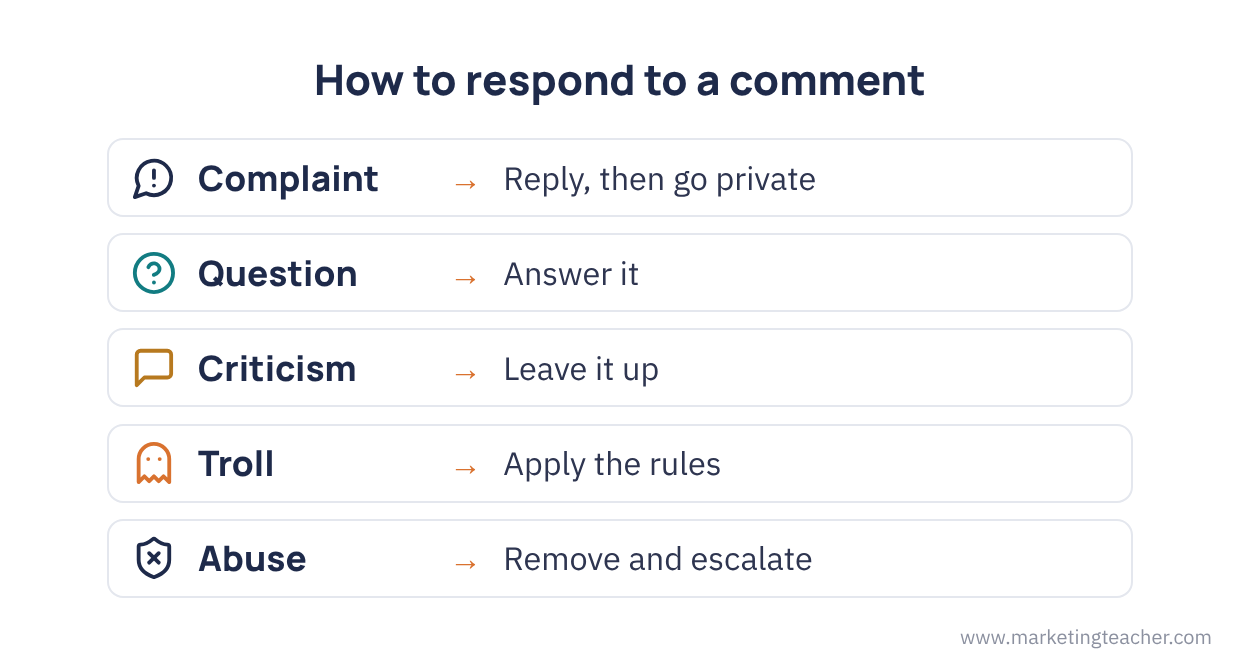
Not every negative comment is a problem to delete. A simple decision path helps:
- Is it a genuine customer with a complaint? Thank them, apologise where appropriate, and move personal details to a private message. Others are watching how you treat this person.
- Is it a question or misunderstanding? Answer clearly and link to help.
- Is it criticism or a strong opinion? Leave it up. Deleting fair criticism usually makes things worse.
- Is it a troll? A troll posts to provoke rather than to get help. Do not argue. Apply the guidelines calmly: hide, warn or block as the rules state.
- Is it abusive, illegal or threatening? Remove it, keep a screenshot record, and escalate to your manager or the platform.
Speed matters, but tone matters more: replies should sound human and avoid copy-and-paste phrases.
User-Generated Content Rights
User-generated content (UGC) such as customer photos and videos is valuable, but it does not belong to the brand just because the brand was tagged. In the UK, copyright arises automatically when someone creates an original work, including a photograph, and it stops others using the work without permission (GOV.UK, n.d.). Sharing a post inside a platform’s own share function is usually covered by the platform’s terms, but copying a photo into an advert, website or brochure needs the creator’s permission.
Good practice is to: ask publicly or privately for permission (“Can we share this? Reply #YesHarbor to agree”); credit the creator by name or handle; keep a record of the permission; and never edit the image in a way that changes its meaning. If the person is paid or given free products in return, the post may become advertising and should be labelled. See Influencer Marketing and UK GDPR and Marketing Compliance for the rules on disclosure and personal data.
Measuring Community Health
Follower numbers alone say little about a community. Community managers track a balanced set of measures:
- Active members: the share of members who posted, commented or reacted in the last 30 days.
- Member-to-member interaction: how many replies come from members rather than the brand.
- Response time: how quickly the brand answers questions and complaints.
- Sentiment: the balance of positive, neutral and negative comments (see Sentiment Analysis for Digital Marketing).
- Moderation load: the number of hidden, removed or reported posts, and the share of reports that were justified.
- Retention: how many new members are still active after three months.
A sudden rise in removed posts or negative sentiment can be an early warning of a wider reputation problem.
Summary
Community management is the everyday work of building a brand community (Muniz & O’Guinn, 2001) while governing it through moderation (Grimmelmann, 2015). The community manager listens, responds, moderates, rewards advocates and reports back. Clear guidelines and a mix of pre-, post-, reactive and automated moderation keep the space safe without stopping conversation. Genuine complaints deserve a fast, human reply; trolls and abuse are handled calmly by the rules. UGC needs the creator’s permission and credit, and community health is judged by activity, interaction, response time, sentiment and retention rather than follower counts.
The slides, worksheet, lesson plan and poster for this lesson are free to download and free to use in your course — no sign-up, no permission needed. See the teacher resources →
Assign this lesson to your class:
Using Canvas, Blackboard or Moodle? Copy the link and paste it into your course page or assignment. More ways to add lessons to your LMS.

