What Is Mobile CRM?
Customer relationship management (CRM) is the system a business uses to store and manage everything it knows about its customers: contact details, purchase history, open orders, service records, and the state of every ongoing conversation. For a long time, that system lived on desktop computers, which meant employees who worked away from a desk (sales reps visiting clients, engineers repairing equipment on site, delivery and service staff out in the field) had no real-time access to it.
Mobile CRM closes that gap. It gives customer-facing employees the same CRM data and the same ability to update it, but from a phone or tablet, wherever they happen to be (Band, 2011). The core value is simple: information can be checked and updated the moment it matters, rather than hours later back at a desk.
How Businesses Use Mobile CRM
A handful of everyday scenarios show why this matters. A sales representative pulls up a client’s account and purchase history in the car park before walking into a meeting, so the conversation starts from what the customer actually needs rather than guesswork. A field engineer repairing equipment at a customer’s site logs the job, takes readings, and captures a signature on a tablet, syncing everything back to head office the moment a connection is available. A retail rep visiting a store counts stock on a handheld device and triggers a restocking order on the spot, instead of writing it down to enter later. A manager approves a discount or a workflow step from their phone between meetings, rather than leaving it sitting in an inbox until they’re back in the office. And a customer service leader checks a live dashboard on a tablet to see how the team is performing right now, not from yesterday’s report.
None of these are really about the technology. They are about closing the delay between something happening in the field and that information reaching, or leaving, the business.
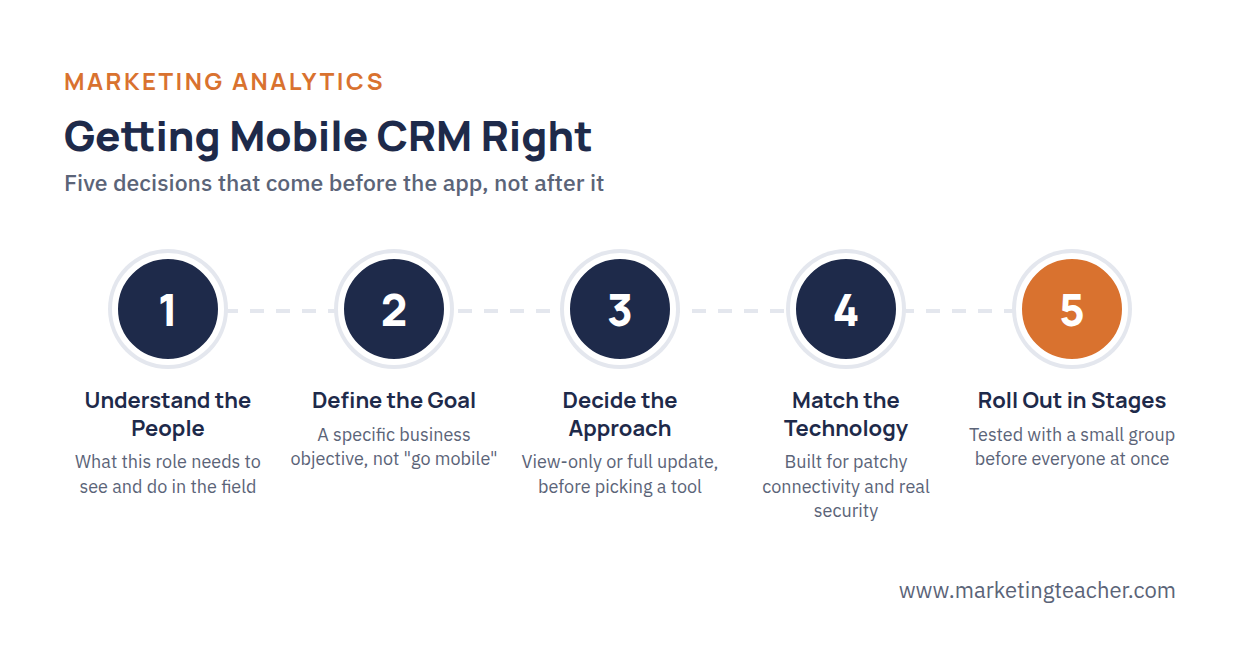
Getting Mobile CRM Right
Giving field employees an app is the easy part. What actually determines whether a mobile CRM rollout succeeds comes down to a handful of decisions made well before launch.
The first is understanding the people who will use it. A mobile CRM app should be built around what a specific role actually needs to see and do in the field, not a shrunk-down copy of the full desktop system. A field engineer needs job history and a way to capture a signature; a sales rep needs account details and the ability to log a lead. Cramming in everything the desktop version offers just makes the app slower and harder to use exactly when speed matters most.
The second is being clear about what the business is trying to achieve. A mobile CRM rollout aimed at “faster response to customers” looks different, and gets measured differently, than one aimed at “more accurate stock counts.” Without a specific goal, it’s hard to tell afterward whether the investment actually worked.
The third is deciding the approach before choosing the technology (Band, 2011). That means settling questions like whether field staff can only view records or also update them, and what happens when there’s no signal, before shopping for an app or a vendor. Choosing the technology first tends to lock a business into whatever that tool happens to do well, rather than what the business actually needs.
The fourth is matching the technology to the reality of fieldwork (Band, 2011). Connectivity in the field is patchy, so the app needs to work offline and sync cleanly once a connection returns, without creating duplicate or conflicting records. And because the device is now carrying customer data outside the office, security has to be treated as seriously as it is on a desktop system, not as an afterthought.
The fifth is rolling it out carefully. Employees who are already busy doing their jobs don’t want to relearn a whole new system overnight. A phased rollout, tested with a small group first and adjusted based on what they run into, succeeds far more often than forcing everyone onto a new app on the same day.
Summary
Mobile CRM extends a business’s customer data and CRM system out into the field, letting sales reps, engineers, and service staff check and update customer information the moment it matters rather than hours or days later. It shows up in scenarios like pulling up account history before a client visit, logging a completed job on site, updating stock on the spot, and approving workflows from a phone. Getting it right depends less on the app itself and more on the groundwork behind it: understanding what each role actually needs, being clear about the business goal, deciding the approach before the technology, building for patchy connectivity and real security, and rolling it out in careful stages rather than all at once.